Install
Part 2 — First launch and verification
Run the game once so BepInEx builds its folders, then confirm the loader actually attached.
BepInEx builds the rest of its folder structure the first time it actually runs inside the game. Doing this now — before adding any plugin — means that if something is wrong, you know it is BepInEx and not the mod. It is the single most useful minute in the whole install.
Launch the game, then quit
Straight to the main menu is enough. You do not need to start a run.
Start Streets of Rogue the way you normally do — Steam's Play button is fine. Wait until the main menu is fully up, give it a couple of seconds, then quit to desktop.
You will not see a console window, and there is no BepInEx splash. Silence at this stage is normal: BepInEx 5 hides its console by default, and with no plugins installed there is nothing to announce.
Check the folders it built
Four new folders and a log file. This is the proof that BepInEx ran.
Go back to your game folder and open BepInEx\. It should now contain this:
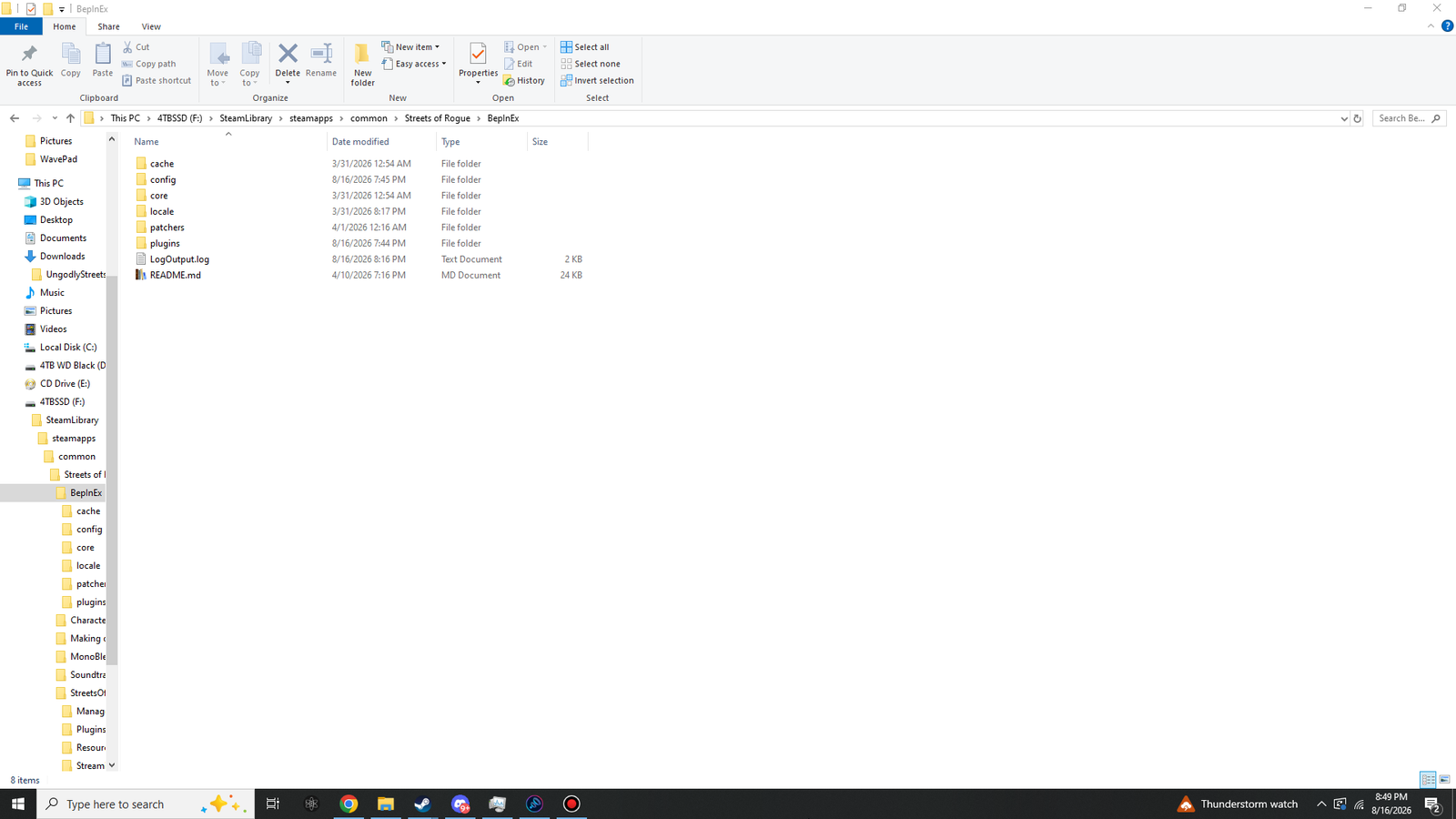 Click to enlarge · 1920 × 1080
BepInEx\ after one launch. Four of these folders did not exist before you ran the game.| Item | Meaning |
|---|---|
core\ | Came with the download. BepInEx's own assemblies. |
cache\ | Generated. Speeds up subsequent launches. Safe to delete at any time; it rebuilds. |
config\ | Generated. Holds BepInEx.cfg now, and your mod settings later. |
patchers\ | Generated. For preloader patchers. This mod does not use one, so it stays empty. |
plugins\ | Generated. Where the mod DLL goes in Part 3. Empty right now. |
locale\ | Came with the download. Translations for BepInEx's own messages. |
LogOutput.log | Generated. Rewritten from scratch on every launch. Your first stop for any problem. |
README.md | Came with the download. BepInEx's own documentation. |
If BepInEx\ still contains only core\, and there is no
LogOutput.log, then BepInEx did not run. That is a Part 1 problem, not a Part 2
problem — jump to Troubleshooting, which opens with exactly this
symptom. Do not continue to Part 3; the plugin cannot load if the loader is not loading.
Read the log
Thirty seconds that will save you from guessing later.
Open BepInEx\LogOutput.log in Notepad. At this stage it is short — about 2 KB. The first
few lines are what matter:
[Message:   BepInEx] BepInEx 5.4.23.5 - StreetsOfRogue
[Info   :   BepInEx] Running under Unity v...
[Message:   BepInEx] Chainloader started
[Info   :   BepInEx] 0 plugins to load
[Message:   BepInEx] Chainloader startup complete
Three things are worth confirming, and only three:
- The version on the first line reads 5.4.x — if it reads 6.0.0, you have the wrong branch and the plugin will never load.
- The game name on that same line is StreetsOfRogue — if it names another game, you extracted into the wrong folder.
- Chainloader startup complete appears somewhere. That sentence is BepInEx saying it got all the way through.
0 plugins to load is the correct and expected result right now. You have not installed
one yet. After Part 3 that line becomes 1 plugin to load, which is how you will confirm
the mod itself.
If you like watching things load, open BepInEx\config\BepInEx.cfg, find the
[Logging.Console] section, and set Enabled = true. A second window
appears alongside the game showing log lines live. It is genuinely useful while diagnosing, and
equally reasonable to leave off — LogOutput.log records the same information either
way.
A working, empty BepInEx install. From here, adding any BepInEx 5 plugin to this game is a copy-and-paste. Part 3 adds this one.