Install
Folder check
Four screenshots of a correct install. Compare yours against them before you report a problem.
These are real screenshots of a finished, working install — not diagrams. Open each one full size and compare it against your own folders. Almost every install problem is visible at this level, and spotting it here takes seconds instead of reading logs.
Every image on this page is shown scaled down. Click any of them to open the untouched 1920 × 1080 original, with a link to open it in its own tab if you want to zoom further. File sizes and dates in the right-hand columns are from that specific machine and will differ on yours — the file names and their locations are what you are checking.
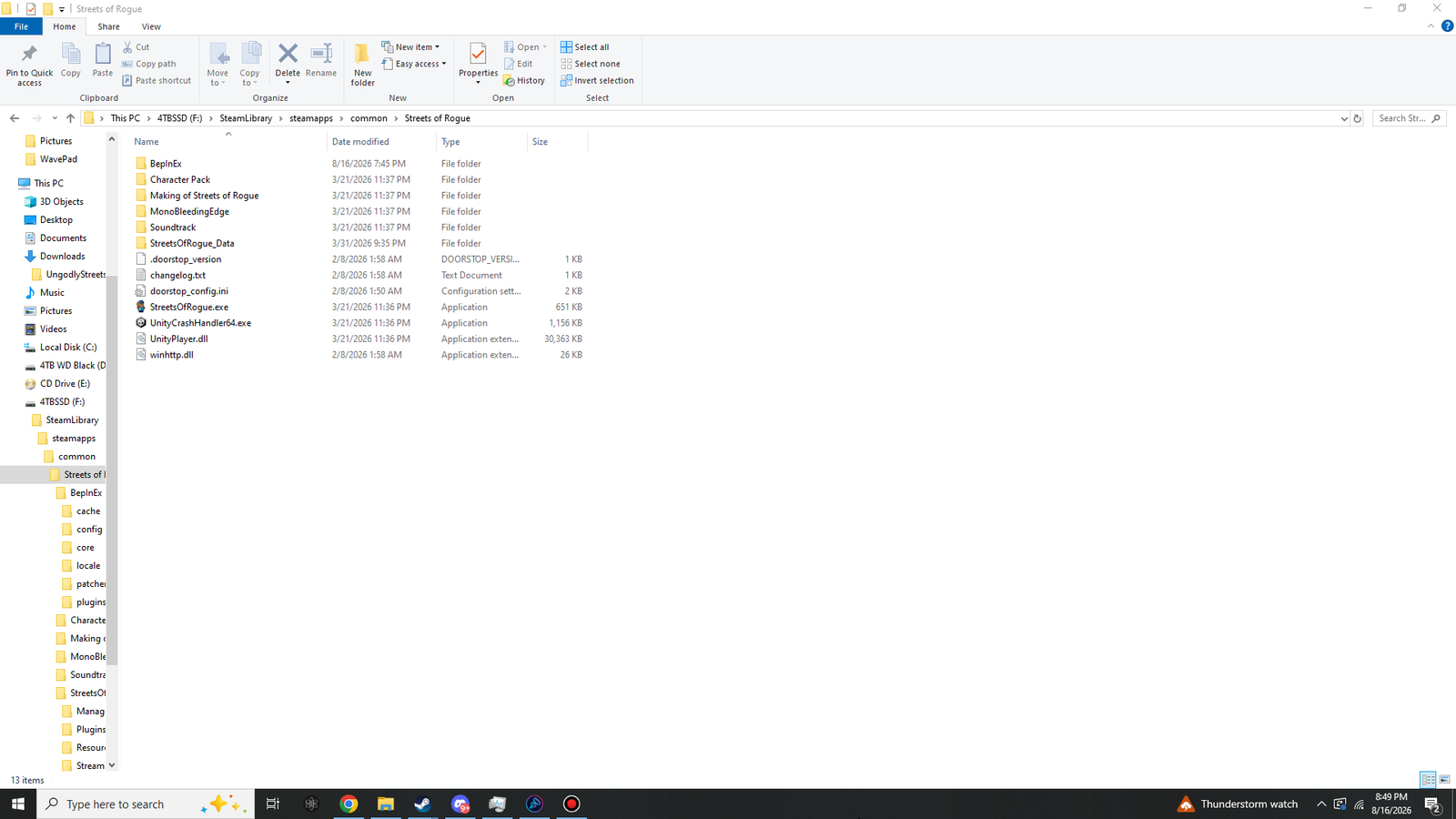
Level 1 — the game folder
 Click to enlarge · 1920 × 1080
StreetsOfRogue.exe, which is the whole point.What to confirm here, in order of how often it goes wrong:
winhttp.dllis in this listing, alongsideStreetsOfRogue.exe— not one level down in a folder named after the zip.doorstop_config.iniand.doorstop_versionare here too. The leading dot on the second one is correct, not a corrupted name.- There is a
BepInExfolder at this level. MonoBleedingEdgeis present — the confirmation that this is a Mono build and that BepInEx 5 is the right branch.- You have not got a second nested
Streets of Roguefolder inside this one.
Character Pack, Making of Streets of Rogue and Soundtrack are
Steam bonus content and appear only if you own them. They have nothing to do with modding. Leave
them alone.
| Name | Type | Approx. size | Origin |
|---|---|---|---|
BepInEx\ | Folder | — | BepInEx zip + first launch |
MonoBleedingEdge\ | Folder | — | The game |
StreetsOfRogue_Data\ | Folder | — | The game |
.doorstop_version | File | 1 KB | BepInEx zip |
changelog.txt | File | 1 KB | BepInEx zip |
doorstop_config.ini | File | 2 KB | BepInEx zip |
StreetsOfRogue.exe | Application | 651 KB | The game |
UnityCrashHandler64.exe | Application | 1,156 KB | The game |
UnityPlayer.dll | Library | 30,363 KB | The game |
winhttp.dll | Library | 26 KB | BepInEx zip |
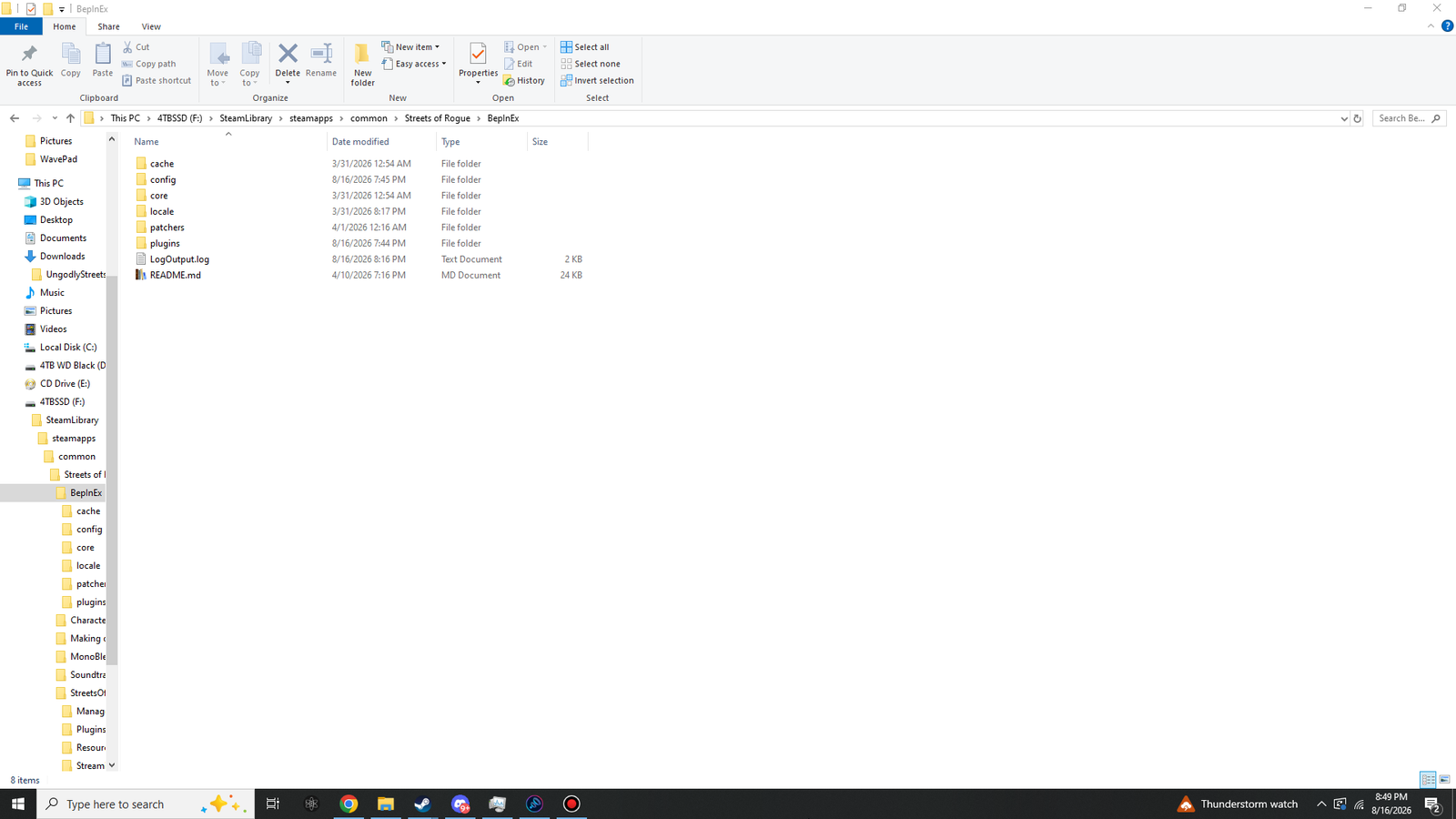
Level 2 — inside BepInEx
 Click to enlarge · 1920 × 1080
BepInEx\ folder after at least one launch. Four of these eight items did not exist before the game ran.
The distinction that matters here is shipped versus generated. core\,
locale\ and README.md came out of the zip. cache\,
config\, patchers\, plugins\ and LogOutput.log
were built by BepInEx the first time it ran.
So if you are missing those five, BepInEx has never successfully started, and no amount of
rearranging plugin files will help. Go back to
Part 1 and check the winhttp.dll placement.
patchers\ folder is correct
Preloader patchers modify assemblies before the game loads them. This plugin does not use one — it patches at runtime instead — so that folder stays empty unless another mod puts something there.
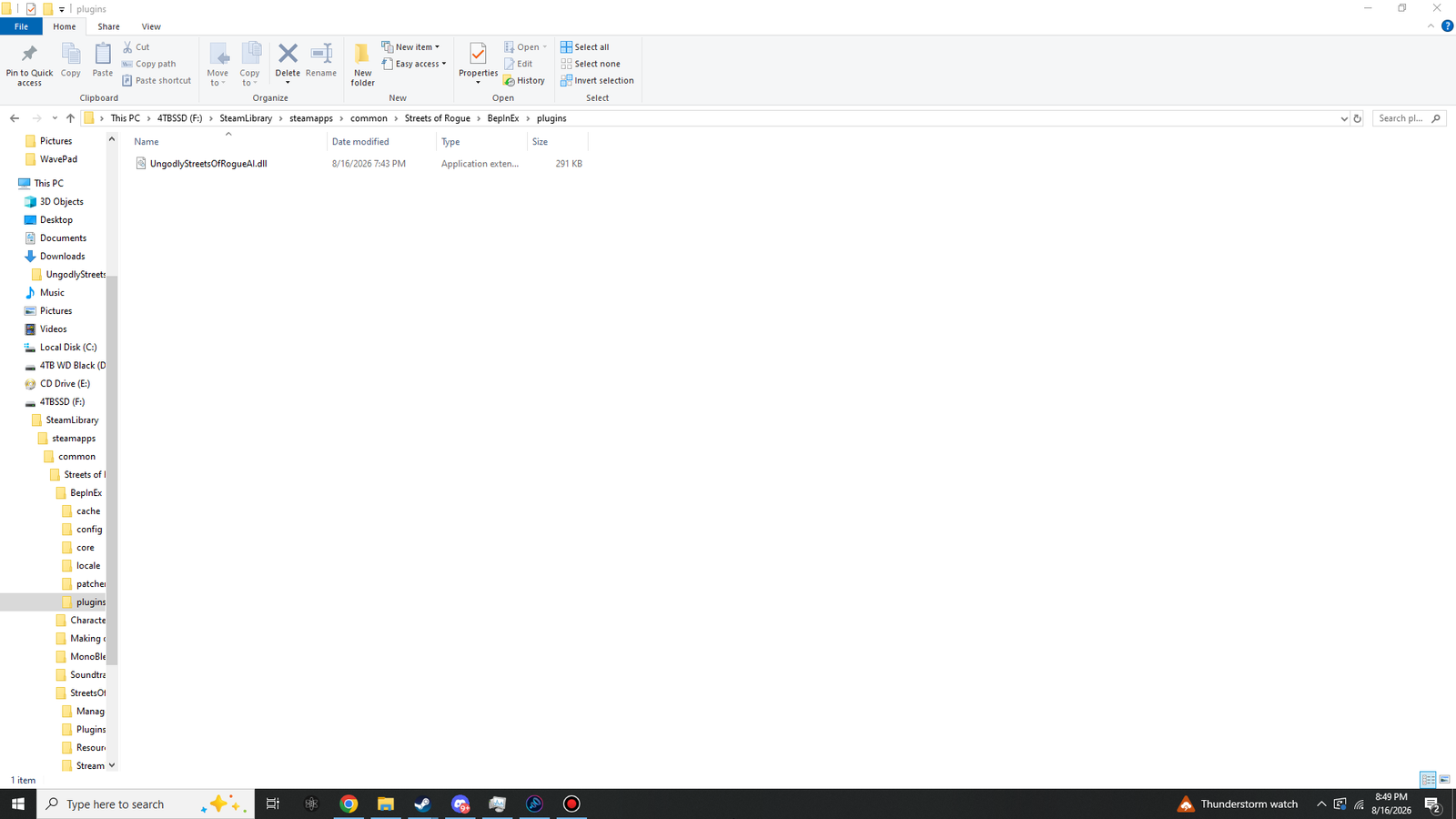
Level 3 — the plugins folder
 Click to enlarge · 1920 × 1080
BepInEx\plugins\. That is a complete plugin install.Check three things:
- The name is exactly
UngodlyStreetsOfRogueAI.dll— no.txton the end, no(1)from a second download. - The size is around 291 KB (297,984 bytes (291 KB)). A much smaller file means a truncated download.
- The Type column reads Application extension, which is how Explorer describes a DLL.
If you run several mods, other DLLs will be listed here beside this one. That is expected and fine — they load independently.
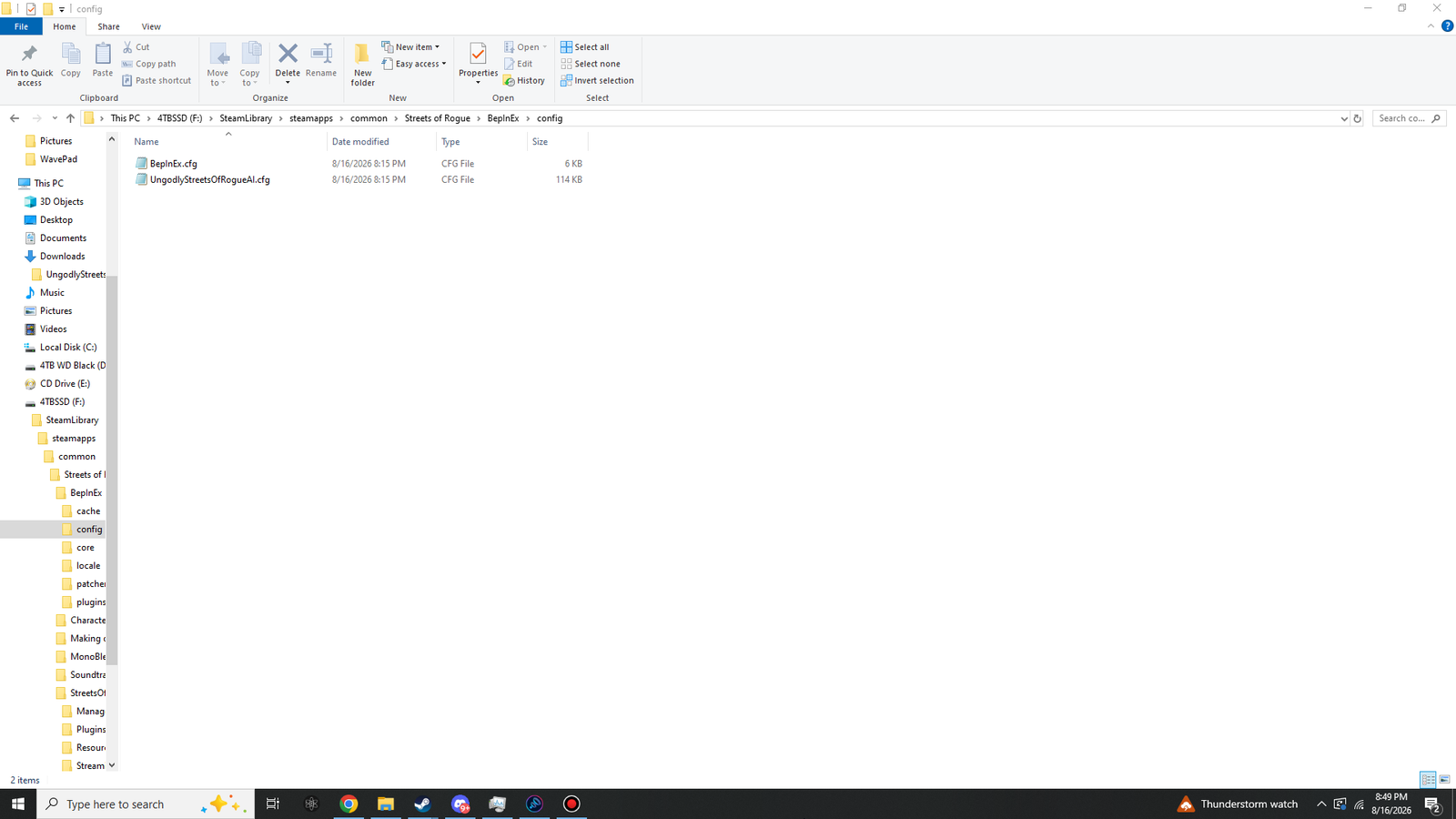
Level 4 — the config folder
 Click to enlarge · 1920 × 1080
This folder is the one that tells you the plugin is not just loaded but alive.
UngodlyStreetsOfRogueAI.cfg is written by the plugin itself on first run — if it is here,
the plugin executed its startup code.
| File | Size | What it is |
|---|---|---|
BepInEx.cfg | about 6 KB | BepInEx's own settings — logging, console, cache behaviour. Created on the first launch in Part 2. |
UngodlyStreetsOfRogueAI.cfg | about 115 KB | All 354 of this plugin's settings, each with its documented range and a plain-English explanation. It is large because of those explanations. See the config file page. |
UngodlyStreetsOfRogueAI.cfg?
Then the plugin did not reach its startup code. That is different from the DLL being in the wrong
place — it usually means BepInEx refused to load it. Open
BepInEx\LogOutput.log and look for an error mentioning the plugin by name; the most
common cause by far is having BepInEx 6 installed instead of 5.
The whole thing at once
Streets of Rogue\
├── BepInEx\
│   ├── cache\                                    generated on first launch
│   ├── config\
│   │   ├── BepInEx.cfg                            generated on first launch
│   │   └── UngodlyStreetsOfRogueAI.cfg        written by the plugin
│   ├── core\                                     from the BepInEx zip
│   ├── locale\                                   from the BepInEx zip
│   ├── patchers\                                 generated, stays empty
│   ├── plugins\
│   │   └── UngodlyStreetsOfRogueAI.dll        <-- you put this here
│   ├── LogOutput.log                             rewritten every launch
│   └── README.md                                 from the BepInEx zip
├── MonoBleedingEdge\                             the game
├── StreetsOfRogue_Data\                            the game
├── .doorstop_version                             from the BepInEx zip
├── changelog.txt                                 from the BepInEx zip
├── doorstop_config.ini                           from the BepInEx zip
├── StreetsOfRogue.exe                            the game
├── UnityCrashHandler64.exe                       the game
├── UnityPlayer.dll                               the game
└── winhttp.dll                                   from the BepInEx zip
If your folders match that tree and the game still behaves as though nothing is installed, the answer is in Troubleshooting — start with the log.