Living with it
The settings panel
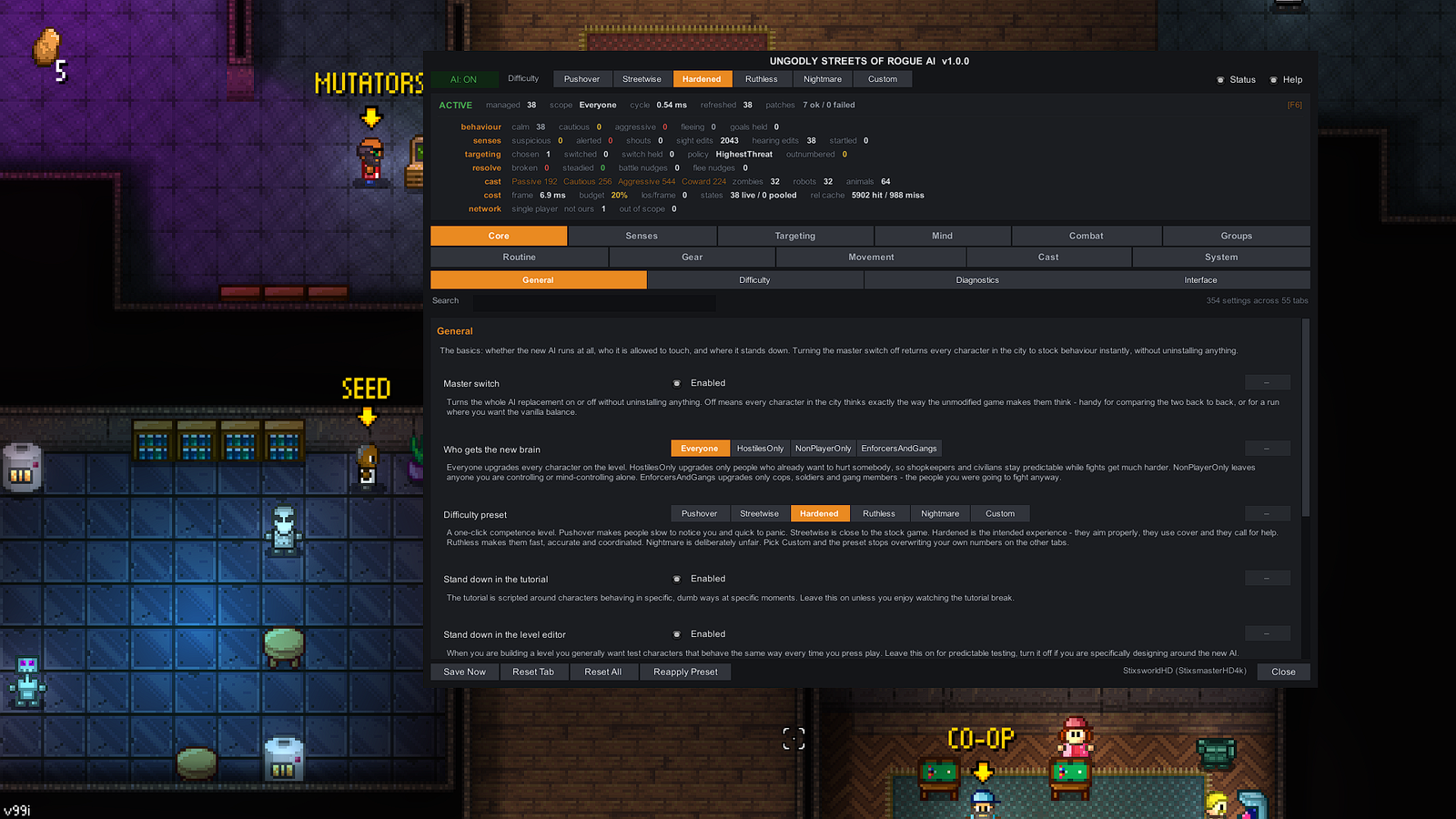
Press F5. Every part of the window, including the live status readout decoded field by field.
There are 354 settings here, which sounds like a lot until you realise you never have to touch any of them — pick a difficulty preset and play. This page exists for when you do want to go deeper, and for the one part of the panel that is genuinely worth learning: the live status readout across the top.
 Click to enlarge · 1920 × 1080
Opening it
Press F5 during a run. The panel is deliberately fully opaque — a translucent window over a Streets of Rogue level becomes unreadable the moment anything catches fire.
On startup the plugin checks F5 against the game's own key bindings and
quietly relocates to a free key if it is already taken, rather than fighting the game for the
keypress. Whatever key is currently live is printed at the far right of the status
readout — in the screenshot above it reads [F6]. That indicator is the
authoritative answer to "which key opens this thing", and it is why the panel is never truly lost.
You can set your own key on Core › Interface.
The status readout, field by field
This is the fastest way to understand what the plugin is doing: open the panel during a fight and watch the counters move. Everything below is read straight off the screenshot above.
Header line
| Field | Reading | Meaning |
|---|---|---|
managed | 38 | Characters on this level currently running the new brain. Rises and falls as a level populates and empties. |
scope | Everyone | Which characters are eligible, mirroring the "who gets the new brain" setting below. |
cycle | 0.54 ms | How long the last full think cycle took. This is the plugin's own cost, not your frame time. |
refreshed | 38 | How many characters were refreshed in the current rolling window. Compare against managed to see the throttle working. |
patches | 7 ok / 0 failed | The health check. All 7 hooks bound successfully. Anything failed means one behaviour has reverted to stock — the Diagnostics tab names it. |
behaviour — what the managed characters are doing right now
calm 38 · cautious 0 · aggressive 0 · fleeing 0 · goals held 0. A quiet level: everyone
calm, nobody suspicious yet. Start a fight and you will watch characters move left to right through
those states. goals held counts characters whose goal the plugin is holding steady
rather than letting the stock arbitration flip it — this is the mechanism that stops the
jitter you get when two goals score almost identically.
senses — what they have noticed
suspicious · alerted · shouts · sight edits · hearing edits · startled. The two "edits"
counters are cumulative and climb constantly — 2,043 sight edits against 38 hearing edits in the
screenshot. Each one is a single adjustment the plugin made to a range check the game was already
performing. A high, steadily climbing sight number is completely normal and is what "sight weighted
by distance, movement, lighting and gunfire" looks like from the outside.
targeting — who they have picked
chosen · switched · switch held · policy · outnumbered. policy names the
active targeting rule (HighestThreat in the screenshot). switch held is the
hysteresis counter: how many times a character wanted to change target and was made to stick with the
current one instead, which is what stops enemies flicking between two targets forever.
resolve — morale
broken · steadied · battle nudges · flee nudges. The nudge counters are the interesting
ones. Stock fight-or-flight is a single formula; this plugin does not replace it, it adjusts the
result. Each nudge is one such adjustment, so these two numbers tell you how often temperament,
morale and group strength actually changed somebody's mind.
cast — the roster classification
Passive 192 · Cautious 256 · Aggressive 544 · Coward 224 · zombies 32 · robots 32 · animals 64.
These are far larger than the 38 characters on the level, because they are roster-wide totals rather
than live counts — the temperament model applied across the game's cast, plus the three special
groups that get their own handling. Watch this row for a moment and you will see it barely moves
while the rows above it change constantly; that is how you tell them apart.
cost — what it is costing you
| Field | Reading | Meaning |
|---|---|---|
frame | 6.9 ms | Total frame time. For reference, 16.7 ms is 60 fps. |
budget | 20% | The share of the frame the plugin is allowed. The adaptive throttle narrows its working slice when frames get expensive. |
los/frame | 0 | Line-of-sight raycasts this frame. Raycasts dominate the cost of everything here, so there is a hard per-frame cap — a refused check simply falls back to the stock range. |
states | 38 live / 0 pooled | Per-character state objects in use versus waiting in the pool. The game recycles agents aggressively, so these are reused rather than reallocated. |
rel cache | 5902 hit / 988 miss | Relationship lookups served from the per-cycle cache versus recomputed. A high hit ratio is the point. |
network — who is deciding
single player · not ours 1 · out of scope 0. In multiplayer this line is the quickest
way to confirm the authority model is behaving: decisions are made on the host only, and a client
defers rather than making choices the host would overwrite a moment later. not ours
counts characters this machine is not the authority for; out of scope counts characters
excluded by your scope setting.
The eleven categories
Two shallow rows of tabs, so nothing is ever more than one click away. Pick one to see what lives inside it.
Core — General · Difficulty · Diagnostics · Interface
The master switch, who the new brain applies to, the difficulty preset, and the stand-downs for the tutorial and level editor. Diagnostics is where the per-hook results live if the header ever reports a failure, and Interface holds the panel's own options including the hotkey.
Senses
Sight and hearing. How much distance, movement, sprinting, crouching, recent gunfire and darkness each weigh, and the hard cap that stops those bonuses stacking into level-wide vision. Separately: how far gunshots, explosions and footsteps carry, and how much walls muffle them.
Targeting
The seven policies — closest, first seen, random, highest threat, weakest, most exposed, biggest grudge — plus focus-fire caps that limit how many characters may pile onto one target, and the switch hysteresis that stops target flicking.
Mind
Temperament and morale: Passive, Cautious, Aggressive, Coward and Adaptive, the cautious timer and the give-up timer that ends a chase, suspicion build and decay rates, and flee-on-low-health with its health percentage and duration.
Combat
Everything about a fight in progress: burst length, the pause between bursts, the aim-up delay before the first round, suppressive fire, the friendly-fire angular line check, cover search and hide/peek cycles, and the Emerald-style actions — strafe, dodge, block with its mitigation percentage and maximum angle.
Groups
How gangs, squads and factions behave collectively — the widened team-size count that makes a gang of six arrive together instead of trickling in, and how group strength feeds back into individual fight-or-flight decisions. Faction relations are read from the game's own matrix and are never written to.
Routine
Life outside combat: how characters behave when nothing is happening, how far they wander, and how firmly the plugin holds a chosen goal steady rather than letting near-identical scores flip it back and forth.
Gear
Weapon and item handling — the choices around what a character reaches for and when, and how that interacts with range, cover and the target they have picked.
Movement
Getting from A to B under fire: relocation when cover stops facing the threat, strafing and random movement, and the anti-stuck handling for characters on foot that the stock game does not have at all.
Cast
Per-group overrides. Zombies, robots and animals do not think like people and get their own handling here, alongside how the game's roster maps onto the temperament model.
System
Performance and networking: the frame budget percentage, the size of the rolling refresh window, the per-frame line-of-sight cap and its budget veto, the adaptive throttle, and the authority rules including whether to respect a client's temporary control of a character.
Difficulty presets
The row along the top of the panel, duplicated on Core › General. One click sets a competence level across every tab.
- Pushover
- Slow to notice, quick to panic. Closer to a power fantasy than a challenge.
- Streetwise
- Close to the stock game. Choose this if you want the plugin's structure without a difficulty change.
- Hardened
- The intended experience. They aim properly, they use cover, and they call for help. This is the default and what the screenshot shows.
- Ruthless
- Fast, accurate and coordinated. Expect to lose fights you would previously have won by walking backwards.
- Nightmare
- Deliberately unfair. It is not balanced and does not pretend to be.
- Custom
- Pick this and the preset stops overwriting your own numbers on the other tabs. If you have hand-tuned settings, select Custom or the next preset click will flatten them.
Who gets the new brain
The scope setting on Core › General decides who is eligible at all.
Everyone | Every character on the level. The default. |
|---|---|
HostilesOnly | Only characters who already want to hurt somebody. Shopkeepers and civilians stay predictable while fights get much harder. |
NonPlayerOnly | Leaves anyone you are controlling or mind-controlling alone. |
EnforcersAndGangs | Only cops, soldiers and gang members — the people you were going to fight anyway. |
Everything else on screen
- Master switch
- Turns the whole AI replacement on or off without uninstalling anything. Off means every character in the city thinks exactly the way the unmodified game makes them think — ideal for comparing the two back to back, or for a run where you want the vanilla balance.
- Search
- Searches every label, key and description across all 55 tabs. Faster than hunting through categories when you half-remember a setting's name.
- Status and Help toggles
- Top right. Status shows or hides the readout block; Help shows or hides the plain-English explanation printed under every setting. Both are on in the screenshot.
- Every numeric setting
- Is a slider, a typed box, and its documented minimum and maximum together — so you can drag roughly or type exactly, and you always know the legal range.
- Save Now · Reset Tab · Reset All · Reapply Preset
- Along the bottom. Reset Tab restores just the tab you are looking at; Reset All restores everything; Reapply Preset pushes the current difficulty preset back over your changes. Individual settings also have their own reset control on the right-hand side of each row.
Cursor and input handover
This gets its own section because it is the thing most in-game mod panels get wrong, and knowing how it works tells you what to expect.
- Opening shows and frees the cursor, and asks the game for its normal pointer rather than whatever crosshair was up — otherwise you are aiming a targeting reticle at checkboxes.
- Input is blocked through the game's own gate, not by swallowing events. The plugin raises the same reason the game itself uses for "this player is typing, do not act on their input". Clearing it lets the game recompute from every other reason still in force, so if you are also frozen or mid-cutscene, control is not handed back early.
- Closing restores everything exactly as found, then pushes the game's own cached cursor choice back through the game's own code path. That re-applies its texture and its lock state, which is what re-establishes correct viewport mapping. The pointer is never warped by hand.
- Re-asserted every frame while open, because the game can legitimately change the pointer underneath you on death, a level transition or a cutscene. The saved "prior" values are deliberately not updated, so whatever the game wanted is still what it gets back.
- Pausing is refused in multiplayer. Time scale is local, so pausing on one machine only desynchronises you from the host.
- If the panel is ever destroyed while open, a force-release restores input, time and pointer regardless. You can never end up unable to move with no window on screen.